
Database Transactions & Deadlock Handling
50+ practical tips to master ACID, isolation levels, retry logic, and deadlock resolution in Laravel, MySQL, and PostgreSQL.
🔍 Introduction
Database transactions are the backbone of data integrity in any application. They ensure that a series of operations either complete successfully or roll back entirely, preserving ACID properties. But when multiple transactions compete for resources, deadlocks can occur — grinding your application to a halt.
This guide provides 50+ practical tips for working with transactions and handling deadlocks effectively.
Whether you're using Laravel's DB::transaction(), raw SQL, or working with MySQL/PostgreSQL, you'll find
actionable advice to keep your data consistent and your app responsive.
DB::transaction() with a closure to automatically handle rollbacks. And for high-traffic applications,
implement a retry loop with exponential backoff to recover from deadlocks gracefully.
📘 Transaction Basics & ACID
Understand the foundation before diving into deadlocks:
- Atomicity: All or nothing — commit or rollback.
- Consistency: Transactions move the database from one valid state to another.
- Isolation: Concurrent transactions are isolated from each other.
- Durability: Committed changes persist even after a crash.
- Use
BEGIN TRANSACTIONandCOMMIT/ROLLBACKexplicitly in raw SQL. - Avoid
autocommit=0in production unless necessary. - Keep transactions as short as possible — minimize lock duration.
- Don't perform external API calls or file I/O inside a transaction.
- Use
SELECT ... FOR UPDATEsparingly — it locks rows. - Use
SELECT ... LOCK IN SHARE MODE(MySQL) orFOR SHARE(PG) for read locks. - Understand the difference between
LOCK TABLESand row-level locking. - Prefer row-level locking over table-level locks for concurrency.
- Use
READ COMMITTEDas a default isolation level in many cases. - Avoid
REPEATABLE READunless you need consistent snapshots. SERIALIZABLEis the strictest but also the most deadlock-prone.- For high concurrency, consider
READ UNCOMMITTEDonly for reporting.
🔒 Isolation Levels Explained
Choose the right level to balance performance and consistency:
- READ UNCOMMITTED – dirty reads allowed, fastest, rarely used.
- READ COMMITTED – prevents dirty reads, default in PostgreSQL and SQL Server.
- REPEATABLE READ – prevents non-repeatable reads, default in MySQL (InnoDB).
- SERIALIZABLE – highest isolation, prevents phantom reads, most deadlocks.
- In MySQL,
REPEATABLE READuses gap locks to prevent phantom reads. - Gap locks increase deadlock risk — consider
READ COMMITTEDto reduce them. - Set session isolation with
SET SESSION TRANSACTION ISOLATION LEVEL .... - Set globally in
my.cnforpostgresql.conf. - In Laravel, you can set isolation using
DB::connection()->setPdo($pdo)or raw SQL. - Test your application under different isolation levels to find the sweet spot.
- For read-heavy apps,
READ COMMITTED+REPEATABLE READoften works well. - Use
LOCK IN SHARE MODEfor consistent reads without blocking updates. - Avoid
SERIALIZABLEunless absolutely necessary.
⚡ Laravel Database Transactions
Laravel provides a clean API for transactions. Use these tips:
- Use
DB::transaction(function () { ... })for automatic commit/rollback. - Nested transactions are supported — but only the outer commit actually writes.
- Use
DB::beginTransaction(),DB::commit(),DB::rollBack()for manual control. - Always check
DB::transactionLevel()to avoid mismatched rollbacks. - In Laravel,
Model::create()andupdate()are transaction-friendly. - Use
DB::beforeExecuting()to hook into query execution. - For long-running transactions, consider using
DB::transaction()with a try-catch. - Catch
DeadlockException(orQueryExceptionwith deadlock code) to retry. - Laravel's
DB::transaction()automatically rolls back on exceptions. - Use
DB::connection('custom')->transaction()for multiple connections. - Avoid using
DB::unprepared()inside transactions. - Use
DB::table('users')->lockForUpdate()to addFOR UPDATE. - Use
DB::table('users')->sharedLock()forLOCK IN SHARE MODE. - Define transaction timeouts using
DB::statement('SET TRANSACTION TIMEOUT 10')(PostgreSQL). - Laravel 10+ allows custom PDO options via
config/database.php. - Consider using the
Transactionaltrait for model events. - Test transactions with
DatabaseTransactionstrait in tests.
🔄 Understanding Deadlocks
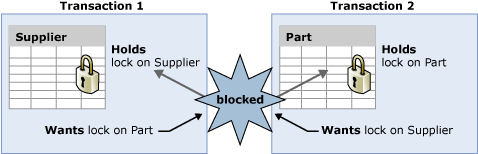
A deadlock occurs when two or more transactions hold locks and wait for each other. Here's how to identify them:
- Deadlocks happen when transactions lock resources in different orders.
- In MySQL, deadlock errors return
ERROR 1213(ER_LOCK_DEADLOCK). - In PostgreSQL, deadlock returns
40P01(deadlock_detected). - Use
SHOW ENGINE INNODB STATUSto view recent deadlocks in MySQL. - In PostgreSQL, check
pg_locksandpg_stat_activity. - Enable deadlock logging:
innodb_print_all_deadlocks = ONin MySQL. - Log deadlock details in Laravel using
DB::listen()andLog::warning(). - A deadlock is different from a lock timeout — timeout occurs when a transaction waits too long.
- Lock timeout can be configured with
innodb_lock_wait_timeout(MySQL). - In PostgreSQL, use
lock_timeoutanddeadlock_timeout. - Most deadlocks are caused by transactions updating the same rows in different orders.
- Indexes can reduce deadlocks by allowing faster row access and fewer row locks.
🛡️ Deadlock Prevention Strategies
Prevent deadlocks before they happen with these techniques:
- Access tables in a consistent order across all transactions.
- If multiple tables are updated, always update them in the same sequence.
- Use
SELECT ... FOR UPDATEto lock rows early to avoid deadlocks. - Reduce transaction size — do only what's necessary.
- Consider using
NOWAITorSKIP LOCKEDto avoid waiting. - In PostgreSQL, use
SELECT ... FOR UPDATE NOWAITto return immediately if lock unavailable. - Use
SKIP LOCKEDfor queue processing to avoid contention. - Lower isolation level to
READ COMMITTEDto reduce gap locks. - Remove unnecessary indexes? Actually, proper indexes reduce lock contention.
- Use
innodb_autoinc_lock_mode=2for better concurrency with auto-increment. - For batch updates, split into smaller transactions.
- Use optimistic locking with version columns (e.g.,
updated_atorversion). - Optimistic locking avoids locks entirely — but requires retry logic.
- Use
@Transactional(propagation=Propagation.REQUIRES_NEW)style in Java, but in Laravel use separate connections. - Avoid user input inside transactions to prevent long waits.
- Set a global
lock_timeoutto fail quickly instead of hanging.
🔄 Retry Logic & Resiliency
Even with prevention, deadlocks can happen. Implement retry:
- Wrap your transaction in a retry loop with a limited number of attempts (e.g., 3–5).
- Use exponential backoff — wait increasingly longer between retries.
- In Laravel, you can catch
Illuminate\Database\QueryExceptionwith SQLSTATE 40001 (deadlock). - Use
DB::transactioninside atry-catchand retry. - Consider using a custom
Retryabletrait or helper. - Log retry attempts to monitor deadlock frequency.
- For critical operations, retry with a fallback to a dead letter queue.
- Use
timeoutandwait_forin PostgreSQL for better control. - In MySQL,
innodb_deadlock_detectcan be disabled for high-concurrency workloads (useinnodb_lock_wait_timeoutinstead). - Test your retry logic with chaos engineering tools.
- Retry only for deadlock errors, not other SQL errors.
- Idempotent operations are easier to retry safely.
- Use
DB::transactionLevel()to ensure you're at the top level before retrying.
📊 Monitoring & Diagnostics
Keep an eye on transaction performance and deadlocks:
- Enable MySQL's
innodb_monitororinformation_schema.INNODB_TRX. - Use
SHOW FULL PROCESSLISTto see active transactions. - In PostgreSQL, use
pg_stat_activityandpg_locks. - Laravel Telescope can show query and transaction logs.
- Use
DB::listen()to log queries and timing. - Monitor
wait_timeoutandinteractive_timeoutin MySQL. - Set up alerts for high deadlock rates.
- Use performance schema to track transaction duration.
- In Laravel, use
Debugbarto profile transactions in development. - Monitor average query time and lock wait time.
- Use
pt-deadlock-logger(Percona) to log deadlocks. - Graph deadlock trends over time.
- Review slow query logs to find problematic transactions.
- Use New Relic or Datadog for transaction monitoring.
❓ Frequently Asked Questions
Click any question to reveal the answer — animated for a smooth experience.
📌 Key Takeaways
- Keep transactions short and avoid external calls inside them.
- Choose the right isolation level —
READ COMMITTEDis often sufficient. - Access tables in a consistent order to prevent deadlocks.
- Use
SELECT ... FOR UPDATEorSHARED LOCKcarefully. - Implement retry logic with exponential backoff for deadlock recovery.
- Monitor deadlocks with
SHOW ENGINE INNODB STATUSorpg_locks. - In Laravel, leverage
DB::transaction()and catchQueryExceptionfor retries. - Consider optimistic locking for read-heavy applications.
🚀 Need help with a specific deadlock scenario? Reach out to us at FreeLearning365.com@gmail.com.


0 Comments
thanks for your comments!